Showing posts with label Unity. Show all posts

Thursday, 4 May 2017

Dog Stealth Game Finished


This the finished stealth game made in unity it has all the required features such as line of sight which you can see in use when one of the guard stop moving a starts shooting when the dog gets within his line of sight. The Projectile was made using a Prefab which is a tennis ball which will end the game on contact with the dog. Finally they is a way to end the game by collecting the bone at the end of the level you will win the game. The major problems i had while making the game was getting the line of sight system to work but i manged to get it working due to the tutorials available.

Thursday, 6 April 2017

Bouncy Teleportation Ball


In Unity We had a large amour of balls and we had to add our own custom script to it so what i did was use the Random Range to set the ball so on contact with other balls it will teleport upwards and horizontally within a set of parameters
The add force part of the code is what makes the ball bounce The If statement is what controls the colliders so on contact with a tagged ball it will activate the next part of the script which will teleport the ball within the parameters. They are decided by a minamum and maxim value as shown within the brackets matched to the X,Y,Z axis

Thursday, 23 March 2017

Dog Catcher Game Stage 4 Rotation of objects 23/3/17


This script i added makes the dog rotate and face a specific vector this is done inside my player movement script the director the player is moving in will make the sprite rotate to face  the direction. I'll be adding the script to the enemy as well as the player.

An issue i had when writing the script was the messed up with the brackets and did not put one where i had to this made it so the new rotation script only worked if i was moving downwards as i never had an bracket between the new code and the last "If" statement.


Thursday, 16 March 2017

Unity Game Dog Catcher Stage 2

This shows the Dog Catchers which now have way points giving them movement once you hit one of the Catchers it will bring up the start gave menu this is done through the Unity UI script.


Thursday, 9 March 2017

Dog Catcher Unity Game Stage 1

i

These are the assets i am using for my dog catcher game all assets all made on Photoshop in order tree, dog, Dog catcher and the wall . The Wall is based off the one used for a different unity game but has been drastically improved. I need to Make a Projectile next which i might use a tennis ball for. . I Have a basic level design done and the movement code .


Tuesday, 7 March 2017

Blood Splatter

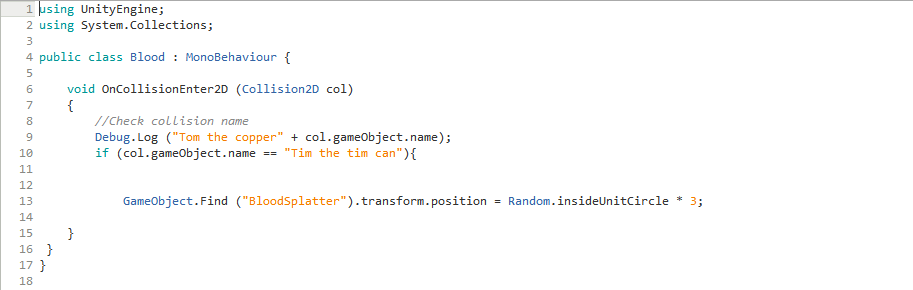
I have learned to do a basic blood splatter for use when you get hit this can be reused and tinkered with to add different effects. To Make this work i used  "Random.InsideUnitCircle"  which will place an object with the axis of the area. I have the center of the circle set to the origin 0 but this is changeable. The Blood is hidden off the screen and Its gets moved via "GameObject.Find" and put in a random location.

GameObjectF.Find ("Ball").transform.position = Random.InsideUnitCircle * 3;